https://github.com/estefan3112/attractplus-applesilicon/releases/tag/3.2.2
16 February 2026
Emulator Frontend Deluxe (update): AttractMode+ 3.2.2 and Smart Themes Project
https://github.com/estefan3112/attractplus-applesilicon/releases/tag/3.2.2
30 January 2026
Negatron - a MAME Desktop Frontend at its best
| No need for you to join the Dark Side of Negatron - Modena (Default) is bright. |
That's why it is by far the best MAME frontend you can get for MacOS:
- Integration into official MAME is excellent in my testing. As I now also integrated my MAME setup into Homebrew for automatic updates, I would not want to opt for the special MAME version called NegaMAME (explained below). You can configure virtually everything in the UI, so it‘s advisable to make backups of your .ini files beforehand.
- The interface is very customizable, even more than QMC2, and the different artwork and manuals you can add to each system is also unmatched by QMC2. Video preview also just works. See the ‚OMG‘ sections below 😉.
- Negatron also has a smart integration of Software Lists, far better than MAMEUI and QMC2 (is broken since quire some time). I still have to look into this further.
- Updates of MAME are recognized during the next Negatron launch, and it also updates its own databases with the new version.
- New - SDL3 Input Mapping: With the implementation of SDL3, the entire User Interface is mapped to joypad support.
- Information from the developer: https://github.com/xinyingho/Negatron/blob/master/README.md
22 December 2025
Welcome back, QMC2!
Quick Hints 2 February 2025 - Running QMC2 for the first time / older MAME installs
Hint #1: Prior to running QMC2 for the first time, please ensure that your MAME install is up and running, i.e. passes the Gatekeeper. This restriction also applies to Intel Macs with modern MacOS systems installed. Without this, the QMC2 setup will not recognize QMC2 as an installed MAME application.
This applies to the MAME executable and the SDL2 Framework, which after each upgrade must again be manually authorized in the Privacy & Security section of the System Configuration.
If you hate this (like I do) -> go for the Homebrew/MacPorts install of MAME, as described in my dedicated post, and no Gatekeeper woes will infest your MAME updates. Further details on QMC2 are mostly still valid from my old post of 2016 on QMC2.
Hint #2: Scanning the ROM directory first time is very buggy in QMC2 and often results in crashes. Don't worry, just restart the app, choose the option "Once" and the scan ends. Be sure not to do any multitasking during this scan.
Hint #3: Older MAME installs - start from scratch: When you move to a newer MAME version after a longer time, the second tip I have is to start a new mame install by renaming the $HOME/Application Support/mame directory containing the old ini files. For example MAME 278 introduced new audio latency options that can make problems with old mame.ini files. So if you are stuck with launching MAME and end up in a blank screen, I recommend that you restart with a new mame.ini file. This should resolve most of the MAME black screens at program launch.
Update 23 December 2025 - First fully notarized QMC2 MacOS Binaries online
I finally managed to create MacOS app bundles (both ARM64/Silicon and Intel) that have been notarized by Apple. For this to succeed, I had to bundle the SDL2 Framework into the app bundle and codesign everything with hardened runtime.
Grab it here: https://github.com/estefan3112/qmc2-mame-fe-MacOS/releases/tag/v244v4
Both App versions should work flawlessly - but please look into the ReadMe file if unsure.
Update 6 May 2024 - GitHub Fork with MacOS Binaries
For easier deployment, I created a fork of the QMC2 Github Repository here:
https://github.com/estefan3112/qmc2-mame-fe-MacOS
You'll find here latest pre-compiled and code-signed versions of QMC2 for both Apple Silicon and Intel Macs. You'll also find Shell scripts for compiling the Upstream source code and self-sign the app. Right now only for Apple Silicon, soon for Intel Macs as well.
Question: I downloaded the QMC2 app, but MacOS tells me that the file is corrupted. I already tried right mouse + open at least twice, but with no success.
Answer: Sorry to hear, your QMC2 app might be in the quarantine. To lift the quarantine, please execute this command in the Terminal
xattr -cr /Applications/qmc2-sdlmame.app (please adjust the path to your QMC2.app, if required)
Enjoy.
Update March 2024 - in (far too late) Memory of Rene Reucher
Only these days, far too late, I learnt that Rene Reucher, the creator of the QMC2 frontend, passed away in spring 2023. Back in 2022, when I wrote the first version of this post, Rene has restarted his work on this quite unique MAME frontend, and it was a pleasure for me to help him out on some minor things in relation to Macs, albeit nothing crucial. From two phone calls, I remember him as a very reasonable and pleasant person. This is my very late "Sorry, and all the best, Rene."
As always, please care for the instructions in the ReadMe and do report any problems back, many thanks.
| I started MAME with the help of QMC2, and it is still a classic frontend experience |
Original post in the following (no longer relevant and rather outdated, as it builds nicely now with Homebrew):
03 December 2025
DarkPlaces / Quake 1 for Apple Silicon/ARM64 + Intel Builds - Ready for Download
I’m pleased to provide MacOS DarkPlaces builds, fully codesigned and notarized, for download and use on Silicon aka ARM64 as well as Intel Macs. The builds are packaged in a sleek DMG for easy installation. Thanks to notarization, also Gatekeeper on ARM64 macOS systems poses no issues. An Intel Mac build landed as well as of 5 Dec 2025.
https://github.com/estefan3112/DarkPlaces-Apple-Silicon-Builds/releases/tag/1.0
This video above is a quick, freehand iPhone recording showcasing DarkPlaces with hires textures running on an M1 Mac Mini connected to a 48-inch TV at 4K resolution. While there are some initial FPS struggles, overall the performance is quite impressive.
Celebrating Quake and DarkPlaces
Quake was the most expensive game I ever bought, since I had to upgrade to a Pentium PC just to play it. I still celebrate the game for its feel, its dark and atmospheric mood, and the brilliant Nine Inch Nails soundtrack (including the idea to have a NIN gun ;-). While many Quake adaptations have been enjoyable, DarkPlaces stands out as the best implementation on modern hardware. You can read more about it here:
https://icculus.org/twilight/darkplaces/
https://github.com/DarkPlacesEngine/DarkPlaces
Self-compilation has always been possible, but a ready-to-play binary for modern Macs was missing. Thanks to the help of AI (yes, it has its advantages), I was able to overcome the final hurdles and now provide this software package as a direct fork of the official Github server.
Requirements for running Quake in DarkPlaces
15 November 2025
Emulation Update November 2025
November 2025 — an excellent opportunity to present a broad overview of updates in macOS emulation. Since this will cover a diverse range of topics, I plan to combine this post with updates to the corresponding main articles, including links to them. Let’s see how well this approach works, and I hope you enjoy the read.
News Nr 1 - macOS 26.1 “Tahoe” has landed smoothly.
Despite the widespread criticism surrounding macOS 26 and iOS/iPadOS 26, I actually like all of them. As usual, I waited for the .1 release before updating, and the process went without a hitch.
The emulators are running well, and I’ll be providing an update on them below anyway.
News Nr 2 - Scaled Resolution and Emulator Performance.
What I realized for the first time these days is the actual impact of scaled resolution on performance - and for official MAME, the effect can be rather dramatic!
- If you encounter performance issues in MAME, it’s worth checking your scaling settings. Some titles show extreme deviations — 1942 is a good example.
- The Metal backend in MAME generally performs much better than OpenGL, which is excellent news.
- Overall, though, performance numbers are solid across all games, with no major concerns irrespective of scaling settings and used backend.
I’ll also be updating the main MAME blog post and linking it here for easy reference.
News Nr. 3 - RetroArch 1.22 is here.
As of this writing, there’s no official blog post yet, but the stable 1.22 build of RetroArch is already available for download from the Libretro website. With so many changes since the last stable release, it’s difficult to highlight any single update. What I can say for sure is that the macOS version has received excellent dedicated improvements, thanks largely to the tireless work of warmenhoven—huge kudos to him, as always.
I’ll also be updating the main RetroArch blog post and linking it here for easy reference.
News Nr. 4 - RetroArch on an iPad Pro rocks.
- If you want to stay on the bleeding edge of RetroArch development, sideloading remains as painful as ever. Fortunately, there’s now an official version of RetroArch available in the App Store, and it’s worth considering if it meets your needs.
- RetroArch takes full advantage of the variable refresh rate on my iPad Pro. This feature is particularly useful for titles like Moon Patrol, which runs at a weird custom refresh rate.
- Consider getting an iPad cover that supports portrait mode. It’s incredibly fun to flip the iPad when playing vertical arcade games, switching into horizontal orientation and making full use of the display.
- As of this writing, iPadOS 26.1 has effectively taken the Home button on my PS4 controller hostage. For the Quick Menu, I’ve had to remap to a different button—R3, for example. It’s not the most comfortable solution, but it works for now. Hopefully, future updates will restore proper Home button functionality in RetroArch.
News Nr 5 - Negatron for Silicon Macs may arrive.
| That's a fully functional Negatron MAME frontend on my Silicon Mac! |
With QMC2 development having completely ended, it’s encouraging to see some progress with Negatron, which looks like the perfect successor to QMC2. At the moment, however, the current Negatron download suffers from significant code‑signing issues, meaning the app will only launch if you start the binary directly from within the app bundle. If you’re willing to take that route, you can already enjoy a highly performant Negatron experience on your Apple Silicon Mac.
I updated the main Negatron blog post from 2020 with the news - here it is.
News Nr 6 - Emulator Research with AI is quite useful.
04 August 2025
Zelda N64 Decompilations and Recompliations on Apple Silicon (WIP)
Besides Super Mario 64, the two Zelda games on my Nintendo 64 are high ranking in my forever games list. Even more than Super Mario 64, these games had severe technical limitations on the console and criminally low fps. The two projects I want to present here are still in beta, but seem both stable enough to advertise. They provide unprecedented gaming experience for Ocarina of Time and Majora‘s Mask.
| My two favorite N64 games besides Super Mario 64, you can see the passage of time ... |
Disclaimer: Legally you require to own the games.
The two solutions I want to present here are
- Ocarina of Time: Ship of Harkinian (SOH) Decompilation - https://www.shipofharkinian.com
| Metal backend with 60fps, re-textured including models |
- Majora's Mask: Zelda Recompilation - https://github.com/Zelda64Recomp/Zelda64Recomp
| The newest version 1.2 provides similar options as SOH - retextures are also breathtaking |
18 July 2025
Super Mario 64 Hacks on Apple Silicon (Native)
Update 26.7.2025: The very promising Launcher for Super Mario 64 received a nice update. See the new chapter at the bottom of this entry!
Update 18.7.2025: This time, a very welcome update of Render96ex_MacOS, including rumble and support for Retina displays. This is definitely worth the work of the manual compile. Build yourself the latest version and install Texture Pack and Dynos, it is definitely worth the effort!
Update 8.7.2025: late to the party with the latest CoopDX version 1.3.2 - https://github.com/coop-deluxe/sm64coopdx/releases/tag/v1.3.2 - another must download, hyper-polished gaming experience with the dynos mentioned below. So Coop Deluxe is the app to go.
Update 26.03.2025: another update of CoopDX with the latest and greatest version of the app and the Render96 Dynos resources, including actual github links. Good to see such great app further updated.
Update 18.11.2024: Amendments to CoopDX, which really rules. First preview of the SM_OSX launcher that already now shines.
Please allow me this major digression from Arcade gaming: I still adore Super Mario 64, and from time to time and fire up my Nintendo64 only for this game. I also like the game as ported to the Nintendo Switch, but the experience is basic.
Now, there have been exiting Super Mario 64 Mods and Hacks out for a while that deliver the goods. If you are capable of the Command Line and Homebrew, they are also available for under MacOS, in particular Silicon Macs. And with a MacOS-native launcher currently in revamp, things could get easier as well.
Here are the instructions for three solutions that worked for me. It's quite easily to loose focus with all the different repositories, so let's look into three solutions that work reliably.
1. smex: The oldest repo and manual install, but perfect for textures and rumble.
2. Render96ex: Not as impressive as under Windows with raytracing, but still powerful.
3. SM64CoopDX: Bleeding edge, a lot of mods and romhacks out there, though designed for cooperatives, you can also play it solo (host yourself). Endless gaming.
Teaser: With all three solutions discussed here, you get incredible Super Mario 64 gaming experience that hugely outperforms the original game. Out of the box comes 60fps and widescreen. It is not an emulation, but a re-compiled MacOS app. With this alone, you should be interested.MacOS-specific hint: MacOS display scaling is your enemy for all these apps! In my own case, I have to set my 4K-monitor to native resolution without scaling, while normally I use MacOS with the largest scaling. But especially with custom textures, this scaling causes a lot of jittery effects in all three solutions. So prior to using any of the following solutions, be sure to switch MacOS-scaling off. It‘s only one click, leave the window open to revert after gaming - no big hassle.
By the way: That can also be very true under Windows11 in my own experience, only that I could not find such an easy solution there as with MacOS.
| Turning off scaling is a must for hi-res textures. |
Requirement for all solutions: Super Mario 64 (USA).z64 rom
MAME 0278 - strong build with a new audio system
Just a brief note on the latest version 0278 of MAME: As advertised in the Release Notes, it comes with a new sound infrastructure that provides for very nice tweaking possibilities. Performance-wise, the latest ARM64 build also shines on my Mac.
| As soon as you enter the MAME menu with TAB, you see the new options called "Audio Mixer" and "Audio Effects" |
Audio Mixer: Handy for all users with more complicated audio signal chains. You can also assign multiple signal chains, if I understand correctly.
Audio Effects: That's very nice, and MAME-typical very much to the very detail. Tuning your audio here provides quite endless tweaking possibilities.
If you are a headphone player like me, try this: Activate Reverb under "Default", switch to the "Very Large Room Bright" setting and put the Resampler on HQ. Suddenly your game sound feels like in a larger Arcade hall! Just a matter of 5 minutes trying, gives you an immersive experience.
Very well done, MAME team!
And yes: After updating your Retroarch MAME (current) core to the latest version, this option is also available in RetroArch.
| Quite vast possibilities here, already the Reverb option is a blast for me. |
Last comment on performance: In this latest version 0278, I again see significant improvements on more complicated games, in particular games that need a dynamic recompiler (both OpenGL and Metal backend). Kudos to the MAME team also in this regard, such a strong build!
As always, happy gaming!
06 February 2025
MAME 0.274 for Silicon Macs received a Dynamic Recompiler
| That's a lot of benchmarks! |
These benchmarks speak for themselves: The new dynarec lets my M2Pro Mac fly in games requiring a dynarec. Besides the listed games, probably all games requiring a CHD (Compressed Harddisk) will gain such dramatic performance improvements.
06 January 2025
Mac MAME Advanced: Intel Build besides Silicon Build
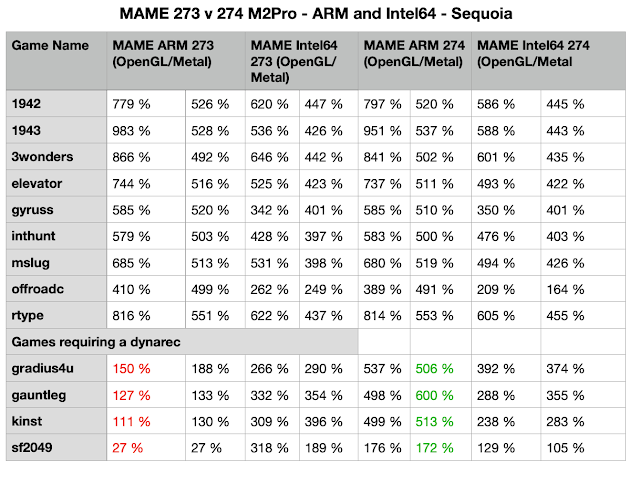
It seems that one of the major drawbacks of current MacOS MAME is the lack of a Dynamic Recompiler (dynarec), which is only available for Intel64 builds. Modern Arcades can crawl even on very powerful Silicon Macs if the games relies on a dynarec. This is where an Intel build comes to the rescue.
| Comparison between ARM/Silicon and Intel64 Build |
What this comparison tells you:
- The ARM build fares much better in old school gaming that don't require a dynarec.
- The Metal backend seems to catch up with the OpenGL backend, which is still faster.
- The performance gains with an Intel64 build in games that require a dynarec are dramatic.
16 July 2024
This July - Hot Emulation News
While during summer, computing tends to slow down a bit, this is certainly not true for the emulator scene. Let's just list the big news that also are relevant for Mac Retrogaming:
- RetroAchievements for Game Cube has landed! Download the most recent development build for MacOS (Universal build) and log into your RetroAchievements account via Tools - done! There is already a huge list of supported GameCube titles - with some luck also those of your own childhood. Needless to tell that should you have missed out on RetroAchievements, it is about time! This is absolutely breaking news. I just fired up my beloved Luigis Mansion, and RetroAchievements immediately activated on my Mac!
- PCSX2 enters a new era: The developers have completed migration to QT and thereby release version 2! Having said that, Silicon Macs still rely on Rosetta2 - but the IntelMac builds are reasonably fast and absolutely stable.
- Mupen64Plus 2.6: Believe it or not, it's the first release since 5 years. There are pre-built releases, however only for Intel64. While I could not test it, my build instructions for an Apple Silicon build should still work.
- Duckstation frequently updates: It's definitely also worth updating Duckstation to its most recent version. Besides tons of under the hood development, also further shaders landed. Also here I still need to come back later.
07 June 2024
Exciting RetroArch Updates - Official Apple AppStore Availability
The RetroArch community remains very busy and provides for another big thing - RetroArch is now downloadable for iOS/iPadOS/tvOS from the official Apple App Store.
According to the libretro.com website, also an official app for MacOS is in the making, but that's not so important anyways.
But this app iOS/iPadOS/tvOS is a big step forward, as you no longer need to care about sideloading or even jailbreaking your mobile device. Installation and updates from the official Apple App Store work like a breeze. Big thanks to the libretro community for such good progress.
If you are really into RetroArch on Apple mobiles, I can highly recommend you this third-party app for all your file transfers: https://imazing.com/ - yes, it costs money, but it's worth every cent. A very smart way of managing your devices and transfering data from and to it.
At this occasion, I also updated my two RetroArch tutorials:
- Part I of the tutorial - updates mainly concern HDR screenshots and playlist improvements
- Part II of the tutorial - updates mainly concern the Cloud Sync functionality in relation to FinalBurn Neo
All in all, RetroArch continues to be a cornerstone of Mac emulation.
08 February 2024
RetroArch Tutorial Part III - Usage 101 / Best Practices
06 February 2024
RetroArch 1.17 release & RetroArch Setup Tutorial - Part II
Update June 2024: Besides minor tweaks all over the document, I included a dedicated RetroArch Cloud Sync section for FinalBurn Neo, as this cannot be put into the official documentation.
This February 2024, RetroArch reached another milestone with the release of the stable version 1.17. The significance of this frontend for the emulation community cannot be overestimated - it's the foundation/inspiration for many other projects and of course the home of an ever growing list of cores that run under this frontend. But it's also a steady inspiration for new concepts and ideas - with some of these ideas remaining in an experimental mode, while others becoming very successful and influential.
This is a follow-up to this post about configuring RetroArch from scratch - Part I.
So let's start Part II of the RetroArch tutorial with a focus on Arcade games - but most of this applies to other cores as well. As you may expect, this post is work in progress and will grow over time. If you are interested in some special RetroArch topics, just leave a comment below.
| Even with 1.17 being out, let me suggest to use nightly builds. |
1. Use nightly MacOS builds:
The nightly MacOS builds of RetroArch have now been stable for several years. I can recommend using them instead of the stable builds. For example, new version 1.2.7 of MoltenVK (the Vulkan layer for MacOS) just landed two days after the stable 1.17 - apparently, this plugin is essential for RetroArch in MacOS, so you would not want to miss this update. But I do not mean that you should update RetroArch every day, but if you do, download a nightly build to benefit from the latest updates.
If things turn out strange for you, you can easily downgrade by installing the stable version over the nightly build. As shown in Part I, updating the app is simple, and you will not loose any of your settings.
13 January 2024
Arcade Emulation on Macs - Status Report December 2023
Update 13 January 2024: Further great news for all Aracade fans.
1942 has RetroAchievements! One of my all-time arcade favorites finally received nice Achievements. Needless to tell that I won't master this set at any point in time, but for all you hardcore gamers, this is definitely something to head for.
OpenEmu 2.41! After some two years, the emulator with a MacOS feeling, OpenEmu, has been finally updated again. If you download the "Experimental" version, you also receive a MAME 250 core. One word of caution: It is still Intel only. However, some initial testing on my M2 Mac mini showed nice performance. In MacOS Sonoma, OpenEmu also activates the Gaming Mode in fullscreen. I certainly will always prefer RetroArch/FinalBurn Neo, but if you want to engage into all this configuration hassles, OpenEmu is worth a try.
Update 22 December 2023: Have a good festive season with a lot of good arcade gaming! These great news will help you so spend some quality gaming time. I also tweaked the main text a bit. Cheers!
Bubble Bobble has RetroAchievements! The wait is over, and these Achievements are pure joy. RetroArch and FinalBurn Neo (don‘t forget to turn the koko-aio shaders on, and my repository of course contains dedicated artwork). It’s a great experience and raises this brilliant game to a new level.
AttractMode Plus updated to 3.0.7, the signed app for Silicon Macs is online: https://github.com/oomek/attractplus/releases/tag/3.0.7
Arcadeflow layout for AttractMode Plus updated to 16.7, grab it here: https://github.com/zpaolo11x/Arcadeflow/releases/tag/16.7
Happy holidays! And again: All here strictly non-commercial, i.e. no ads, and any comments trying to benefit will be removed.
———————
Inspired some interesting reads out there (Dolphin Emu progress reports, PCSX2 progress reports, and last but not least https://www.readonlymemo.com/) I do this status report in December 2023 on Mac Arcade emulation (including iOS emulation). Don't get me wrong: Those emu progress reports are much more into technical stuff than this blog - still the format inspires. And it's also a very good moment to do this, as there is a lot of good things to report. And before you ask: No tvOS experience here, sorry ;-).
In short: Arcade emulation on Macs/iOS was never better than now. Let's discuss why.
(1) MacOS Sonoma: Upgrading to the latest MacOS from Ventura was hassle-free. The new OS just works, and so do all emulators so fae (and Homebrew, most importantly). For sure, you will ask about this Game Mode that landed in MacOS for the first time. Happy to report that RetroArch properly launches in Game Mode when in fullscreen (MacOS tells you this with a notification each launch).
| Apologies for Shots in German ;-). |
(2) FinalBurn Neo (RetroArch Core for MacOS/iOS): This core continues to impress and remains a clear number one in Mac Arcade emulation. The RetroArch documentation provides a nice summary of the main differences between MAME and FinalBurn Neo: https://docs.libretro.com/library/fbneo/ - in short, FinalBurn Neo takes compromises on accuracy in favor of playability by accepting 'quality of life hacks' that MAME doesn't. Since my latest post on this core (actually a full setup guide on RetroArch for Arcade games), the developers took huge efforts to stay in sync with MAME official (as of this post, this is version 261). Highscore support further increased for my favorite games. And most importantly, it is the only reliable RetroArch arcade core for RetroAchievements. Remember: For playing in HC Mode (the real thing without save states and rewind), you need to disable the rom hack core option when running FBNeo and restart.
In short: FinalBurn Neo remains the best Arcade emulator on MacOS/iOS systems.
27 December 2023
Christmas Retrogaming with koko-aio shaders
A brief note: This forum thread contains two Christmas add-ons for the koko-aio shader of RetroArch. As a regular reader, you will know that this is my absolute favorite shader, for which I complile an arcade artwork collection on GitHub.
Forum thread: https://forums.libretro.com/t/merry-christmas/43569
My arcade artwork compilation for koko-aio in RetroArch: https://github.com/estefan3112/koko-aio-slang
This Christmas artwork also makes heavy use of the ambilight effects, and the results are incredible. Just see how the background colors change with the color of the game.
Theme 1 by koko-aio:
Theme 2 by alexb3d:
Enjoy a festive gaming season!
03 October 2023
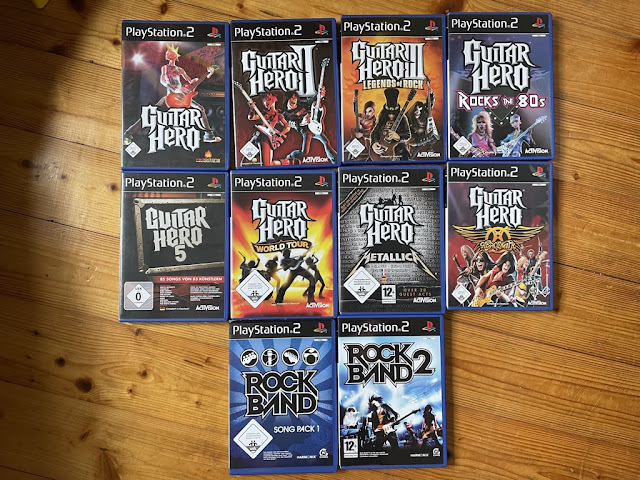
Special Feature: Guitar Hero in PCSX2 (WIP)
| For a long time, those were my only PS2 games - believe it or not. |
On the software side, all you need is a nightly build of PCSX2: https://pcsx2.net/ - it is still Intel only, but works very nicely on Apple Silicon machines as well. The app comes with a nice updater, which in the case of nighly builds provides you with daily updates, and those are mostly smooth.
17 September 2023
Update: AttractMode Plus 3.0.6 for Apple Silicon and ArcadeFlow Theme
Update December 2023: Please be sure to head for version 3.0.7 on the official GitHub site (see my December 2023 post), as these here have codesigning issues. Thanks!
Update 17 September 2023: AttractMode Plus 3.0.6 for Apple Silicon is here:
https://drive.google.com/file/d/1YbPK_sQodnHLzIN6eY0WyXxkqNfp8ORa/view?usp=drive_link
Please report on any problems, many thanks.
Update 15 September 2023: HOTFIX of AttractMode Plus 3.0.5 for Apple Silicon is here:
https://drive.google.com/file/d/1qrJL4TlR-qJwq7hg8isoYVGnx1jiIP2Q/view?usp=drive_link
Recent changes in Homebrew again caused Attract Mode 3.0.5 to no longer work. Just to be clear: The image should be self-sufficient, i.e. it should not depend on Homebrew and any changes in there.
Thanks to the unknown user for the feedback in the comments, and happy to receive feedback.
Update 14 August 2023: AttractMode Plus 3.0.5 for Apple Silicon is updated, as the July version had a problem with Homebrew dependencies, this one should work now flawlessly.
Release notes: https://github.com/oomek/attractplus/releases/tag/3.0.5
And I forgot - if you want to compile this on your Mac, it's easy, provided that you can work in the Terminal:
- download this file as a raw file: https://github.com/oomek/attractplus/blob/master/util/osx/self_build_macos.sh
- make the sh executable: chmod 755/Users/xxxxxxxxxxxxx/Downloads/self_build_macos.sh
- launch self_build_macos.sh (by dragging into the Terminal; the script should then build and also self-sign the app, which can the run on your Mac, but on no other Mac; by this you can avoid the above app signed with my dev certificate)
Enjoy!
21 April 2023
Mac RetroArch Setup Tutorial for Arcade Games - Part I
Update June 2024: Some small, but great RetroArch news considered here. First, HDR screenshots work now! And the new function "Add To Playlist" is such an important usability improvement of RetroArch Playlists. Last section "Other Arcade Cores" also updated.
February 2024: so finally the RetroArch Tutorial Part II is out, but please be sure to have gone through this Part I first 😊
21 April 2023: Added a short section as regards the Steam version of RetroArch.
20 March 2023: RetroArch 1.5.0 a.k.a. ‚The MacOS Release‘ (just kidding) was released - it is a huge improvement for Macs - https://www.libretro.com/index.php/retroarch-1-15-0-release/ and everything in this article also applies to the new stable build. I have not tested the Steam version, though because updating the newest Nightly manually is very convenient on MacOS, as also described below.
About this posting: As the new Vulkan driver for MacOS is a game changer for Retroarch in MacOS, it became necessary to update this entry. Don't be too afraid of this lengthy article, it's a checklist of what RetroArch is capable of, and the result of this work is an unmatched gaming experience, even in old-school arcade games.
06 April 2023
Presenting: RetroArch Arcade Presets for the koko-aio shader
Update 6 April 2023: I released v 0.3 of my Arcade koko-aio shader
https://github.com/estefan3112/koko-aio-slang/releases/tag/0.3
Important change besides new presets: The backdrop presets (see the example here - Space Imvaders Deluxe) work in the same directory.
No need to repeat all of the Release Notes here. The shader gets better and better, and so do my presets, now 52. Tested under MacOS, iPadOS and Windows 11.
| v 0.2 sees old-school games with Backdrops landing |