08 February 2024
RetroArch Tutorial Part III - Usage 101 / Best Practices
06 February 2024
RetroArch 1.17 release & RetroArch Setup Tutorial - Part II
Update June 2024: Besides minor tweaks all over the document, I included a dedicated RetroArch Cloud Sync section for FinalBurn Neo, as this cannot be put into the official documentation.
This February 2024, RetroArch reached another milestone with the release of the stable version 1.17. The significance of this frontend for the emulation community cannot be overestimated - it's the foundation/inspiration for many other projects and of course the home of an ever growing list of cores that run under this frontend. But it's also a steady inspiration for new concepts and ideas - with some of these ideas remaining in an experimental mode, while others becoming very successful and influential.
This is a follow-up to this post about configuring RetroArch from scratch - Part I.
So let's start Part II of the RetroArch tutorial with a focus on Arcade games - but most of this applies to other cores as well. As you may expect, this post is work in progress and will grow over time. If you are interested in some special RetroArch topics, just leave a comment below.
| Even with 1.17 being out, let me suggest to use nightly builds. |
1. Use nightly MacOS builds:
The nightly MacOS builds of RetroArch have now been stable for several years. I can recommend using them instead of the stable builds. For example, new version 1.2.7 of MoltenVK (the Vulkan layer for MacOS) just landed two days after the stable 1.17 - apparently, this plugin is essential for RetroArch in MacOS, so you would not want to miss this update. But I do not mean that you should update RetroArch every day, but if you do, download a nightly build to benefit from the latest updates.
If things turn out strange for you, you can easily downgrade by installing the stable version over the nightly build. As shown in Part I, updating the app is simple, and you will not loose any of your settings.
13 January 2024
Arcade Emulation on Macs - Status Report December 2023
Update 13 January 2024: Further great news for all Aracade fans.
1942 has RetroAchievements! One of my all-time arcade favorites finally received nice Achievements. Needless to tell that I won't master this set at any point in time, but for all you hardcore gamers, this is definitely something to head for.
OpenEmu 2.41! After some two years, the emulator with a MacOS feeling, OpenEmu, has been finally updated again. If you download the "Experimental" version, you also receive a MAME 250 core. One word of caution: It is still Intel only. However, some initial testing on my M2 Mac mini showed nice performance. In MacOS Sonoma, OpenEmu also activates the Gaming Mode in fullscreen. I certainly will always prefer RetroArch/FinalBurn Neo, but if you want to engage into all this configuration hassles, OpenEmu is worth a try.
Update 22 December 2023: Have a good festive season with a lot of good arcade gaming! These great news will help you so spend some quality gaming time. I also tweaked the main text a bit. Cheers!
Bubble Bobble has RetroAchievements! The wait is over, and these Achievements are pure joy. RetroArch and FinalBurn Neo (don‘t forget to turn the koko-aio shaders on, and my repository of course contains dedicated artwork). It’s a great experience and raises this brilliant game to a new level.
AttractMode Plus updated to 3.0.7, the signed app for Silicon Macs is online: https://github.com/oomek/attractplus/releases/tag/3.0.7
Arcadeflow layout for AttractMode Plus updated to 16.7, grab it here: https://github.com/zpaolo11x/Arcadeflow/releases/tag/16.7
Happy holidays! And again: All here strictly non-commercial, i.e. no ads, and any comments trying to benefit will be removed.
———————
Inspired some interesting reads out there (Dolphin Emu progress reports, PCSX2 progress reports, and last but not least https://www.readonlymemo.com/) I do this status report in December 2023 on Mac Arcade emulation (including iOS emulation). Don't get me wrong: Those emu progress reports are much more into technical stuff than this blog - still the format inspires. And it's also a very good moment to do this, as there is a lot of good things to report. And before you ask: No tvOS experience here, sorry ;-).
In short: Arcade emulation on Macs/iOS was never better than now. Let's discuss why.
(1) MacOS Sonoma: Upgrading to the latest MacOS from Ventura was hassle-free. The new OS just works, and so do all emulators so fae (and Homebrew, most importantly). For sure, you will ask about this Game Mode that landed in MacOS for the first time. Happy to report that RetroArch properly launches in Game Mode when in fullscreen (MacOS tells you this with a notification each launch).
| Apologies for Shots in German ;-). |
(2) FinalBurn Neo (RetroArch Core for MacOS/iOS): This core continues to impress and remains a clear number one in Mac Arcade emulation. The RetroArch documentation provides a nice summary of the main differences between MAME and FinalBurn Neo: https://docs.libretro.com/library/fbneo/ - in short, FinalBurn Neo takes compromises on accuracy in favor of playability by accepting 'quality of life hacks' that MAME doesn't. Since my latest post on this core (actually a full setup guide on RetroArch for Arcade games), the developers took huge efforts to stay in sync with MAME official (as of this post, this is version 261). Highscore support further increased for my favorite games. And most importantly, it is the only reliable RetroArch arcade core for RetroAchievements. Remember: For playing in HC Mode (the real thing without save states and rewind), you need to disable the rom hack core option when running FBNeo and restart.
In short: FinalBurn Neo remains the best Arcade emulator on MacOS/iOS systems.
27 December 2023
Christmas Retrogaming with koko-aio shaders
A brief note: This forum thread contains two Christmas add-ons for the koko-aio shader of RetroArch. As a regular reader, you will know that this is my absolute favorite shader, for which I complile an arcade artwork collection on GitHub.
Forum thread: https://forums.libretro.com/t/merry-christmas/43569
My arcade artwork compilation for koko-aio in RetroArch: https://github.com/estefan3112/koko-aio-slang
This Christmas artwork also makes heavy use of the ambilight effects, and the results are incredible. Just see how the background colors change with the color of the game.
Theme 1 by koko-aio:
Theme 2 by alexb3d:
Enjoy a festive gaming season!
03 October 2023
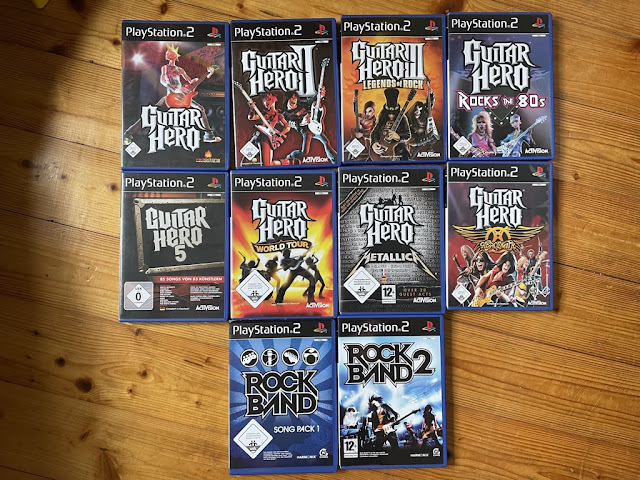
Special Feature: Guitar Hero in PCSX2 (WIP)
| For a long time, those were my only PS2 games - believe it or not. |
On the software side, all you need is a nightly build of PCSX2: https://pcsx2.net/ - it is still Intel only, but works very nicely on Apple Silicon machines as well. The app comes with a nice updater, which in the case of nighly builds provides you with daily updates, and those are mostly smooth.
17 September 2023
Update: AttractMode Plus 3.0.6 for Apple Silicon and ArcadeFlow Theme
Update December 2023: Please be sure to head for version 3.0.7 on the official GitHub site (see my December 2023 post), as these here have codesigning issues. Thanks!
Update 17 September 2023: AttractMode Plus 3.0.6 for Apple Silicon is here:
https://drive.google.com/file/d/1YbPK_sQodnHLzIN6eY0WyXxkqNfp8ORa/view?usp=drive_link
Please report on any problems, many thanks.
Update 15 September 2023: HOTFIX of AttractMode Plus 3.0.5 for Apple Silicon is here:
https://drive.google.com/file/d/1qrJL4TlR-qJwq7hg8isoYVGnx1jiIP2Q/view?usp=drive_link
Recent changes in Homebrew again caused Attract Mode 3.0.5 to no longer work. Just to be clear: The image should be self-sufficient, i.e. it should not depend on Homebrew and any changes in there.
Thanks to the unknown user for the feedback in the comments, and happy to receive feedback.
Update 14 August 2023: AttractMode Plus 3.0.5 for Apple Silicon is updated, as the July version had a problem with Homebrew dependencies, this one should work now flawlessly.
Release notes: https://github.com/oomek/attractplus/releases/tag/3.0.5
And I forgot - if you want to compile this on your Mac, it's easy, provided that you can work in the Terminal:
- download this file as a raw file: https://github.com/oomek/attractplus/blob/master/util/osx/self_build_macos.sh
- make the sh executable: chmod 755/Users/xxxxxxxxxxxxx/Downloads/self_build_macos.sh
- launch self_build_macos.sh (by dragging into the Terminal; the script should then build and also self-sign the app, which can the run on your Mac, but on no other Mac; by this you can avoid the above app signed with my dev certificate)
Enjoy!
06 April 2023
Presenting: RetroArch Arcade Presets for the koko-aio shader
Update 6 April 2023: I released v 0.3 of my Arcade koko-aio shader
https://github.com/estefan3112/koko-aio-slang/releases/tag/0.3
Important change besides new presets: The backdrop presets (see the example here - Space Imvaders Deluxe) work in the same directory.
No need to repeat all of the Release Notes here. The shader gets better and better, and so do my presets, now 52. Tested under MacOS, iPadOS and Windows 11.
| v 0.2 sees old-school games with Backdrops landing |
13 January 2023
Sneak Peek: Massive RetroArch/FinalBurn Neo Update (WIP)
Update 13 January 2023, several amendments and Preemptive Frames as third big thing
2023 starts with some big news for Mac Retrogaming: RetroArch received a Vulkan driver for MacOS via the MoltenVK layer and further big things. I try to explain why this will probably become a major game changer and even less reason for me to use MAME.
First: Vulkan and HDR
The MacOS Vulkan shader comes with HDR, nicely configurable in the UI. I had to heavily scale down the default settings to achieve decent colors on my HDR monitor, however. Contrast must go up tremendously here.
(wip: insert default settings vs my settings here)
Vulkan let's you use more of the latest and greatest shaders. One shader that can be easily overlooked is the koko-aio shader (bundled with RetroArch, but only github provides for the latest version 3.5 currently):
https://github.com/kokoko3k/koko-aio-slang
This shader provides for screen bezel reflection and other goodies and is easily configurable and editable (after some initial work). Here is an example of my first work results (videos will follow, the main point are the reflections on the screen bezel, which incredibly add value) - the bezels are included in the shader configuration!
![]() |
| HDR and bezel reflections as you play are a significant upgrade. The background image needs further adjustment. |
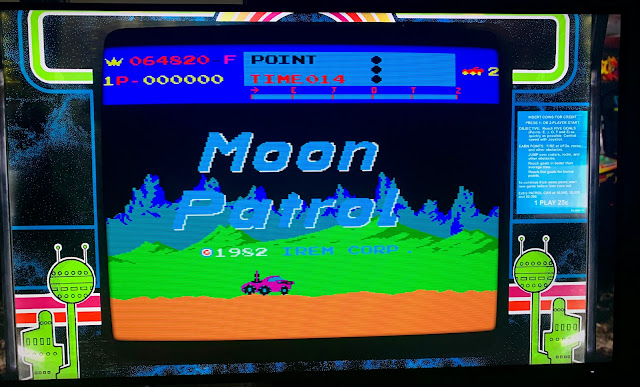
FinalBurn Neo is the best choice for everybody that has a 60Hz fixed rate LCD: In the Core Options of FinalBurn Neo, be sure that "Force 60 Hz" is activated (you need to close the Core and restart, if changed!). It truly makes a difference with difficult candidates, such as Moon Patrol:
![]() |
| Moon Patrol scrolling at 60 Hz is perfect (again, see the screen bezel reflections!), the vertical lines come from the screenshot. |
![]() |
| The system's default refresh was at 56,97 Hz, and this must cause severe hickups with 60 Hz fixed rate monitors. |
In essence, perfect scrolling in FinalBurn Neo can be achieved easily, while the workaround explained for MAME in an earlier post seems more of a hack. That‘s a huge thing.
28 December 2022
Google Search Milestone 🥁🎉😎 - staying strictly non-commercial
So I learned these days that Google Search sees this Blog, and here‘s a milestone for clicks. It is very nice to see that this bears some relevance. And repeating my pledge: No monetization whatsoever happens here! Keep on retrogaming!
26 December 2022
Off-Topic: Mupen64plus on Mac Silicon - finally here
Update Christmas 2022: I created a script for a fully fledged compile of mupen64plus.
Please download the zip file under this link:
https://drive.google.com/file/d/1EG6fMN-NmQl5cPZ20SNFGdych-wGmxNa/view?usp=sharing
After extraction, please check whether it is executable; if not:
chmod 755 mupen64plusSilicon.sh
With this script, you get all built automatically as described below. Be sure to have all the dependencies installed as explained below.
Only one warning: Although the Rice plugin builds successfully, it fails in my testing with several errors. For the time being, it does not work.
And if you want a frontend: That one works well, even if only an Intel binary (take the latest development build):
https://github.com/dh4/mupen64plus-qt#development-builds
Original post from 3 October 2022:
This is major (at least for me), thus I post these non-MAME news as a change: It runs on Apple Silicon, and quite well!
- a (nearly) fully functional mupen64plus core with GildeN64 GFX, SDL joypad support and two optional RSPs (HLE and CXD4)
- very decent performance at 1280x1024 (I did not yet test higher resolutions)
- fully functional hires texture packs (crucial for me)
- everything is still considered 'experimental', but very good for me to go so far
- run it out of a directory, so I do not mess around with an app image
- Homebrew (initial install)
- sdl2 (with all associated dependencies)
- libpng
- freetype2
- zlib
- cmake
- nasm
11 December 2022
Moving to MacOS Ventura
After some waiting, I moved to MacOS Ventura 13.0.1 from Monterey without any issues so far.
| Ventura seems to be a no-brainer for MAME |
This is a rather short post because there is not much to report: MAME and all frontends seem to work flawlessly. Benchmarks show approximately identical results (OpenGL became slower through various releases, Metal benchmarks still don't work properly, but at least the purple flash is gone when starting MAME and games).
Further nice things to report:
All emulators mentioned in this post work.
Joypad configuration is massively improved, and Nintendo Joypads and Joycons can be connected. For Joycons and Dolphin, you only need to follow Andrew‘s instructions:
https://youtu.be/Y4FqRpFi5Fo (a brilliant channel, by the way)
I already tested my beloved Super Mario Galaxy 2, and it blows my mind :-).
The new Apple Silicon build of GIMP 2.10.32 runs extremely well.
If there is anything else to report, I will do an update here.
21 November 2022
RetroAchievements is just brilliant and highly addictive! (November Update)
Brief update after s month in RetroAchievements: It continues to amaze me!
- New sets come in very frequently, and the recent Moon Patrol set is brilliant. With sets like these, you learn more about the games and what is achievable (at least by very good gamers). The community is enthusiastic and grateful.
- As an open system, you can switch between emulators/RetroArch cores or systems (Mac/iPad/Windows/Raspberry Pi) and always work on your achievements. This is amazing.
- For Arcades, I went back to the Arcade Stick, these challenges demonstrate that you need them for serious Arcade gaming. My beloved PS4 joypad is just too casual.
- Even if I will probably not master any set fully, I really like looking at my achievements and think of next steps (closing in to top 50%, at least).
- But where are you, fellow gamers? Let‘s connect!!! 😃
First: Whatever I write here, you need to experience it yourself to really appreciate it.
I never had a close look into RetroAchievements, though it has been around for some time. What a mistake, now I have to play all these console games from scratch again ;-), but now without save states, but just the original games!
Though arcade games don‘t play the lead role in here, they are still worth a try. Just to clarify, this is not MAME, but Finalburn Neo in RetroArch. So if you still need a reason to test RetroArch for arcade games - here it is.
Please see https://retroachievements.org/gameList.php?c=27 - there are currently 218 arcade games registered with a set. Arcade games that are worth a try in RetroAchievements are:
Galaga, Gyruss, Phoenix, Metal Slug Series, Shinobi
06 October 2022
Attract Mode on Steroids: At-The-Arcade Flex is a must tryout
Update 6 October 2022: This GitHub repository provides very recent Apple Silicon builds of Attract Mode
https://github.com/djhan/attractplus-for-mac
See https://github.com/djhan/attractplus-for-mac/blob/master/attract-2.6.2-41.dmg
And Attract Mode builds very nicely on Silicon Macs, just use the create-pkg.sh Script from the /util/osx subdirectory. It only works with Homebrew but not MacPorts, though. And if you want to use the created dmg on another Mac (even identical AppleID), you need to codesign the binary, the dylibs and the app container manually, otherwise you get a "permission denied" error and other error messages.
——-
During my testing, I could not identify any flaws, except for the non-functional history.dat plugin. So kudos to DJHan for these builds. For Intel builds, revert to the discussion below and try his Intel builds, or just stick with the official old builds that still work fine.
Minor update 10 July 2022: As explained in the comments below, if you want to compile your own .app bundle (which works nicely), it seems to me that you must sign it with your own Developer Certificate. Otherwise the compiled app would even not work on your own Mac (at least I think so).
Attract Mode still impresses, as its layout capabilities are further evolving in the community. This release of a layout called "At-The-Arcade-Flex" is so outstanding that I had to produce this small video.
How to get there:
- Setup, part 1 - is a mandatory read, in particular how to toggle new layouts
- Download and install the theme from here: http://forum.attractmode.org/index.php?topic=3979.0 - read instructions carefully, but note: On Macs, the gtc-common folder goes into the .attract root directory of your user.
- Download the updated cabs from the same forum post and put them all in a directory of your choice (must match with the directory below!)
- And these are the important parts of your Arcade.cfg file - cabinets folder definition in red:
executable $HOME/Games/mame/mame
args [name]
workdir $HOME/Games/mame/
rompath $HOME/Games/mame/roms/
romext .zip;.7z
system Arcade
info_source listxml
nb_mode_wait 2
exit_hotkey Joy0 Button12
artwork cabinets $HOME/Games/mame/cabinets_am
artwork flyer $HOME/Games/mame/flyers
artwork marquee $HOME/Games/mame/marquees
artwork snap $HOME/Games/mame/videosnaps;$HOME/mame/snap
artwork video $HOME/Games/mame/videosnaps
artwork wheel $HOME/.attract/scraper/mame/wheel
New Lightweight GLSL Shader around - some testing comparison
If you browse this blog, you'll see how important I deem shaders for MAME. Proper shader configuration was a bit of the start of this blog. So no wonder if I report about a promising new lightweight GLSL shader.
![]() |
| MAME-PSGS in action, good looking and performant |
You find the new shader here: https://github.com/TheCodeTherapy/MAME-PSGS. According to the ReadMe, this shader is designed for rather low-key non-Windows devices running MAME. Clearly modern Macs run every BGFX MAME shader with ease, but let's see which performance gains a truly lightweight shader can achieve.
16 July 2022
MAME on Apple M1 - as good as expected!
- SUPERB The Liquid Retina XDR-display with 3024x1964 is a real highlight. Above all the ProMotion refresh rate of 120 Hz provides you with butter-smooth scrolling out of the box. Just activate waitvsync on top, and you get perfect scrolling. But don’t use nothrottle as your games would run double speed.
- GOOD: This laptop produces surprisingly good sound quality. Retrogames sound very nice!
- GOOD: It did not produce any heat during my testing, and no fan noise. Always such a good thing compared to most Windows and MacIntel laptops.
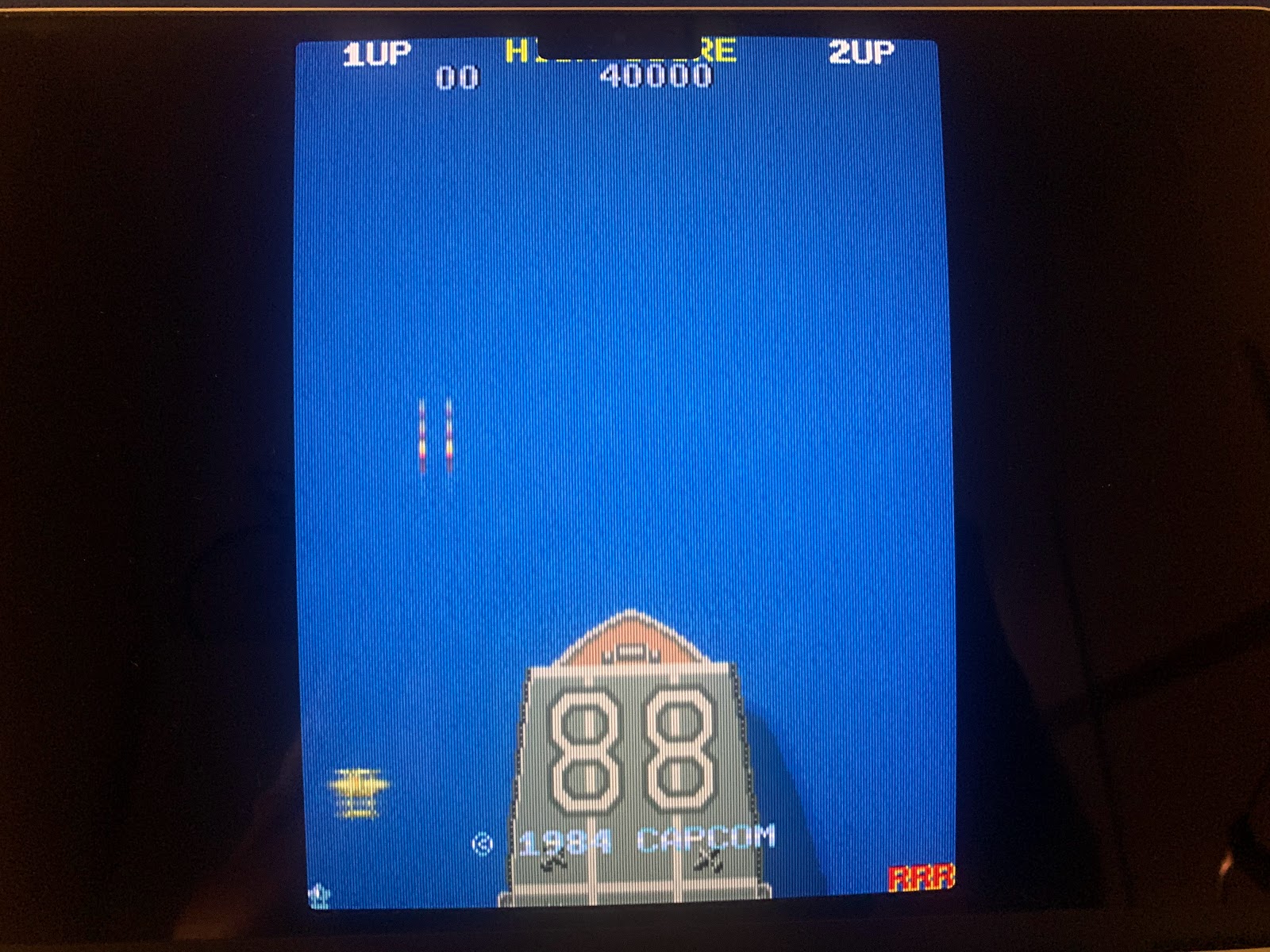
- BAD: In some games, e.g. 1942, the display notch is quite a nuisance (see photo below). But it’s not terribly bad, if it makes you crazy, use a bezel and shrink your screen, or just turn to window mode.
- SURPRISE: Initial benchmarks (as I used to do them) provide for worse results than on my Mac mini M1, even on the same external display. The M1 Pro should provide better results, so something is wrong. In practice, this is totally irrelevant, as the games run just nicely so far.
./mame -video bgfx -str 60 -noafs -bgfx_screen_chains crt-geom -bgfx_backend opengl -noreadconfig -nosleep -nothrottle -lowlatency
02 April 2022
FINALLY: perfect scrolling in MacMAME by configuration!
24 December 2021
MAME and RetroArch in macOS 12.1 Monterey
Just a fast post on Monterey: Both MAME and RetroArch/FinalBurn Neo work flawlessly, both on Intel and Silicon machines available for me.
After the read of Ars Technica's review of macOS Monterey and the release of version 12.1, I found it safe enough to to the upgrade.
06 October 2021
January 2016 - September 2021: 100.000 Views - Thank You
Without realizing it, this September saw my blog passing the 100.000 views mark. Even in rather silent times, this documentation seems to help Mac users.
Thank you for your interest, this is my contribution to MAME. Please let me repeat that this blog will always remain strictly non-commercial.
Cheers.
07 May 2021
Final Burn Neo 1.0.0.2 is the better MAME on Macs
Fast update 29 August 2021: After quick tests of MAME 0.235 and FBNeo 1.0.0.3/RetroArch Metal 1.9.8, the situation is still the same. Important note, however: After updating FBNeo (as well as any other Core), restart your Mac! Weirdly any updated Core crashes RetroArch immediately, while after a restart, everything works fine.
These are quite heretic news: On my Macs (both M1 and Intel), many arcade classics play better on the brand new combo Final Burn Neo 1.0.0.2/RetroArch Metal 1.9.2 than current MAME. If you are curious and ready to dive into RetroArch, this is definitely worth a try.
![]() |
| Moon Patrol (FBNeo with crt-guest-dr-venom2 shader) |
I tested the newest incarnations of Final Burn Neo (via RetroArch frontend) and MAME official on my Macs, and to my surprise, Final Burn Neo currently has a clear edge over MAME in some classic arcade games. If you want to do your own testing, I recommend that you try out these three games, where results are quite obvious:
07 February 2021
MAME Arcade Bezel Update!
Just to let you know that my Github repository containing realistic bezel artwork for MAME is significantly updated. No need to repeat the ReadMe file in Github, just move there:
https://github.com/estefan3112/MAME-Realistic-Bezel-Artwork/blob/master/README.md
Shinobi contains all updates, including the Screen Mask (very much smoothing the screen borders) and
adding a dedicated Screen Bezel (thereby adding a lot of depth to the bezel).
I was looking for a long time for a screen bezel for Oddyssey2/Videopac - so many thanks to SuSGoART for that one (I found it in the libretro forum, conversion to MAME layout format by myself).
While this project will probably never end, I believe that it is a very nice moment to grab the repo and enjoy the new stuff. Comments as always much appreciated.